本文是使用代理后提交时出现的BUG,本来是重复的,已删除 ,做个纪念。
不知道是数据太大了,还是什么其他原因:
XML/HTML代码
- [ERROR] 2015/11/19 01:22:08 parse response header: bufio: buffer full POST neatstudio.com:80/admin/admincp.php?job=article
- HTTP/1.1 200 OK
- Date: Wed, 18 Nov 2015 17:22:08 GMT
- Server: Apache/2.2.22 (Debian)
- X-Powered-By: PHP/5.4.41-0+deb7u1
- Set-Cookie: cid=17; expires=Fri, 18-Dec-2015 17:22:08 GMT
- Set-Cookie: title=brew+upgrade%E4%B8%8D%E8%83%BD%E5%8D%87%E7%BA%A7go+1.5.1%E7%9A%84%E8%A7%A3%E5%86%B3%E6%96%B9%E6%A1%88; expires=Fri, 18-Dec-2015 17:22:08 GMT
- Set-Cookie: description=deleted; expires=Thu, 01-Jan-1970 00:00:01 GMT
- [ERROR] 2015/11/19 01:22:19 parse response header: bufio: buffer full POST neatstudio.com:80/admin/admincp.php?job=article
- HTTP/1.1 200 OK
- Date: Wed, 18 Nov 2015 17:22:18 GMT
- Server: Apache/2.2.22 (Debian)
- X-Powered-By: PHP/5.4.41-0+deb7u1
- Set-Cookie: cid=17; expires=Fri, 18-Dec-2015 17:22:19 GMT
- Set-Cookie: title=brew+upgrade%E4%B8%8D%E8%83%BD%E5%8D%87%E7%BA%A7go+1.5.1%E7%9A%84%E8%A7%A3%E5%86%B3%E6%96%B9%E6%A1%88; expires=Fri, 18-Dec-2015 17:22:19 GMT
- Set-Cookie: description=deleted; expires=Thu, 01-Jan-1970 00:00:01 GMT
估计是标题中有特殊字符?还是其他的呢?
或者是内容太多了吧?
在brew upgrade的时候,出错信息如下:
XML/HTML代码
- brew upgrade
- ==> Upgrading 1 outdated package, with result:
- go 1.5.1
- ==> Upgrading go
- ==> Downloading https://storage.googleapis.com/golang/go1.5.1.src.tar.gz
- Already downloaded: /Library/Caches/Homebrew/go-1.5.1.tar.gz
- ==> Downloading https://storage.googleapis.com/golang/go1.4.2.darwin-amd64-osx10.8.tar.gz
- Already downloaded: /Library/Caches/Homebrew/go--gobootstrap-10.8.tar.gz
- ==> ./make.bash --no-clean
- ==> ./make.bash --no-clean
- ==> Cloning https://go.googlesource.com/tools.git
- Cloning into '/Library/Caches/Homebrew/go--gotools--git'...
- fatal: unable to access 'https://go.googlesource.com/tools.git/': Failed to connect to go.googlesource.com port 443: Operation timed out
- Error: Failed to download resource "go--gotools"
- Failure while executing: git clone https://go.googlesource.com/tools.git /Library/Caches/Homebrew/go--gotools--git
于是我想到,可以使用proxychains4来进行访问(之前已经安装 goagentx + cow [with shadowsocks] ),然而:
XML/HTML代码
- proxychains4 brew upgrade
- [proxychains] config file found: /usr/local/Cellar/proxychains-ng/4.10/etc/proxychains.conf
- [proxychains] preloading /usr/local/Cellar/proxychains-ng/4.10/lib/libproxychains4.dylib
- ==> Upgrading 1 outdated package, with result:
- go 1.5.1
- ==> Upgrading go
- ==> Downloading https://storage.googleapis.com/golang/go1.5.1.src.tar.gz
- Already downloaded: /Library/Caches/Homebrew/go-1.5.1.tar.gz
- ==> Downloading https://storage.googleapis.com/golang/go1.4.2.darwin-amd64-osx10.8.tar.gz
- Already downloaded: /Library/Caches/Homebrew/go--gobootstrap-10.8.tar.gz
- ==> ./make.bash --no-clean
- Last 15 lines from /Users/xiaojianliang/Library/Logs/Homebrew/go/01.make.bash:
- text/template
- go/doc
- go/build
- cmd/go
- fatal error: runtime: bsdthread_register error (unset DYLD_INSERT_LIBRARIES)
-
- runtime stack:
- runtime.throw(0x3e9855)
- /usr/local/go/src/runtime/panic.go:491 +0xad fp=0x7fff5fbff390 sp=0x7fff5fbff360
- runtime.goenvs()
- /usr/local/go/src/runtime/os_darwin.c:103 +0x60 fp=0x7fff5fbff3a8 sp=0x7fff5fbff390
- runtime.schedinit()
- /usr/local/go/src/runtime/proc.c:141 +0x5f fp=0x7fff5fbff3d0 sp=0x7fff5fbff3a8
- runtime.rt0_go(0x7fff5fbff408, 0x4, 0x7fff5fbff408, 0x0, 0x0, 0x4, 0x7fff5fbff670, 0x7fff5fbff6c6, 0x7fff5fbff6cc, 0x7fff5fbff6cf, ...)
- /usr/local/go/src/runtime/asm_amd64.s:95 +0x116 fp=0x7fff5fbff3d8 sp=0x7fff5fbff3d0
-
- READ THIS: https://git.io/brew-troubleshooting
-
- These open issues may also help:
- Homebrew goes ahead with installation after warning dev tools aren't installed https://github.com/Homebrew/homebrew/issues/19580
这回倒好,还没有到git clone,就直接出错了。看来proxychains和golang不兼容,怎么办?于是干脆我直接先clone一下看看:
XML/HTML代码
- :~$ proxychains4 git clone https://go.googlesource.com/tools.git /Library/Caches/Homebrew/go--gotools--git
- [proxychains] config file found: /usr/local/Cellar/proxychains-ng/4.10/etc/proxychains.conf
- [proxychains] preloading /usr/local/Cellar/proxychains-ng/4.10/lib/libproxychains4.dylib
- Cloning into '/Library/Caches/Homebrew/go--gotools--git'...
- remote: Counting objects: 827, done
- remote: Finding sources: 100% (12/12)
- remote: Total 14355 (delta 9764), reused 14348 (delta 9764)
- Receiving objects: 100% (14355/14355), 8.98 MiB | 119.00 KiB/s, done.
- Resolving deltas: 100% (9764/9764), done.
- Checking connectivity... done.
果然OK了。那么我再直接试一下upgrade吧?
XML/HTML代码
- brew upgrade
- ==> Upgrading 1 outdated package, with result:
- go 1.5.1
- ==> Upgrading go
- ==> Downloading https://storage.googleapis.com/golang/go1.5.1.src.tar.gz
- Already downloaded: /Library/Caches/Homebrew/go-1.5.1.tar.gz
- ==> Downloading https://storage.googleapis.com/golang/go1.4.2.darwin-amd64-osx10.8.tar.gz
- Already downloaded: /Library/Caches/Homebrew/go--gobootstrap-10.8.tar.gz
- ==> ./make.bash --no-clean
- ==> ./make.bash --no-clean
- ==> Cloning https://go.googlesource.com/tools.git
- Updating /Library/Caches/Homebrew/go--gotools--git
- ==> Checking out revision d02228d1857b9f49cd0252788516ff5584266eb6
- ==> go build
- ==> go build
- ==> Caveats
- As of go 1.2, a valid GOPATH is required to use the `go get` command:
- https://golang.org/doc/code.html#GOPATH
-
- You may wish to add the GOROOT-based install location to your PATH:
- export PATH=$PATH:/usr/local/opt/go/libexec/bin
- ==> Summary
-
Flutter | 评论:0
| 阅读:31702
Submitted by gouki on 2015, November 19, 1:05 AM
相信很多朋友在升级到OSX EI Capitan后发现proxychains无效了。随便你设置什么代理 ,都无法用来上网。
经过多次测试,发现程序没问题,然后到了官网后,发现有一个issue里也提到了这个问题,最后确认是SIP的问题,于是重启电脑,按cmd+R进入恢复模式,打开终端输入:csrutil disable,然后重启,一切OK~
对于开发人员来说,csrutil还是disable吧。比如brew 也有这个问题。
Tags: proxychains4, brew
Flutter | 评论:0
| 阅读:28508
Submitted by gouki on 2015, November 11, 1:30 PM
只有图,没有字,随便看看吧
[attach=973]
参考来源:
1、http://www.server110.com/sec_news/201511/11322.html
2、http://netsecurity.51cto.com/art/201510/495611.htm
3、http://www.hostloc.com/forum.php?mod=viewthread&tid=289531&page=1#pid3775357
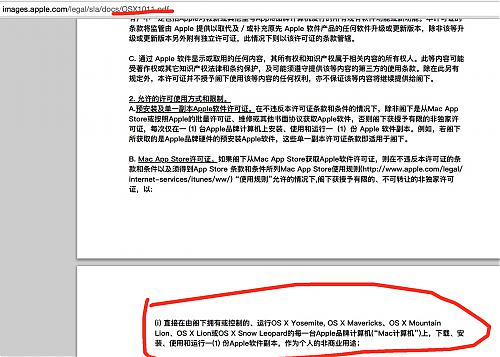
4、http://www.court.gov.cn/zgcpwsw/jiangsu/jsshaszjrmfy/xs/201507/t20150710_9441657.htm 这个才是原地址,看最后一段话,明显是交友不慎啊
图片附件(缩略图):
Tags: sablog, phpspy
Misc | 评论:0
| 阅读:26497
Submitted by gouki on 2015, November 5, 9:36 AM
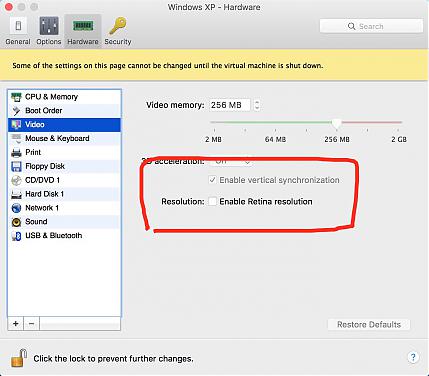
自从PD10开始,其实分辨率已经都可以自由调整了,但还是有很多朋友说,为什么分辨率那么大,图标和鼠标那么小?设置了分辨率后一重启又恢复了?
其实PD 10的虚拟机配置里有一个选项:
只要将这个勾去掉,你所有的分辨率的设置就都可以保存,而不再受retina的分辨率大小限制了。。
不信你可以加上试试(加上和取消这个勾不用重启,你就可以看到你的虚拟机分辨率的变化了。。。)
Flutter | 评论:0
| 阅读:25831